 Electric Lights
 The light-up peg board, back on your Mac.
Push in glowing pegs, make them twinkle and chase, start from thirteen pictures, or turn your own photos into pegs. Free to play.
macOS 14 or later · Apple silicon and Intel · Ready for macOS 27
Version 3.0 · Coming soon · Release notes → · Read the docs →
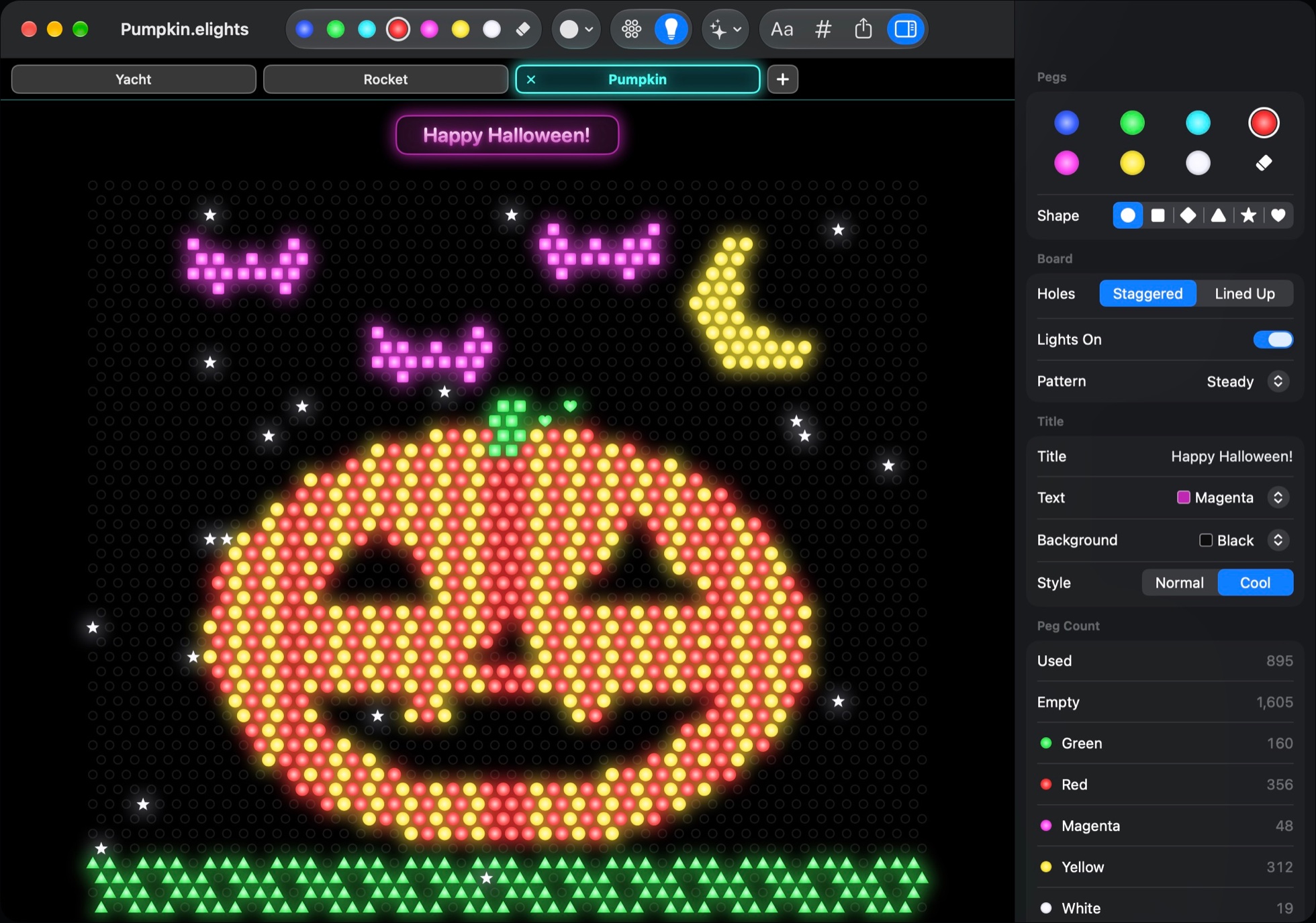
Flip the lights on.
This is a real Electric Lights picture, glowing the same way it does in the app. Pick a picture and a light pattern.
Your photos, in pegs.
Drag in a photo, paste one, or choose File ▸ Photo to Pegs. You see the photo beside a live preview of the pegs, and nothing changes until it looks right.
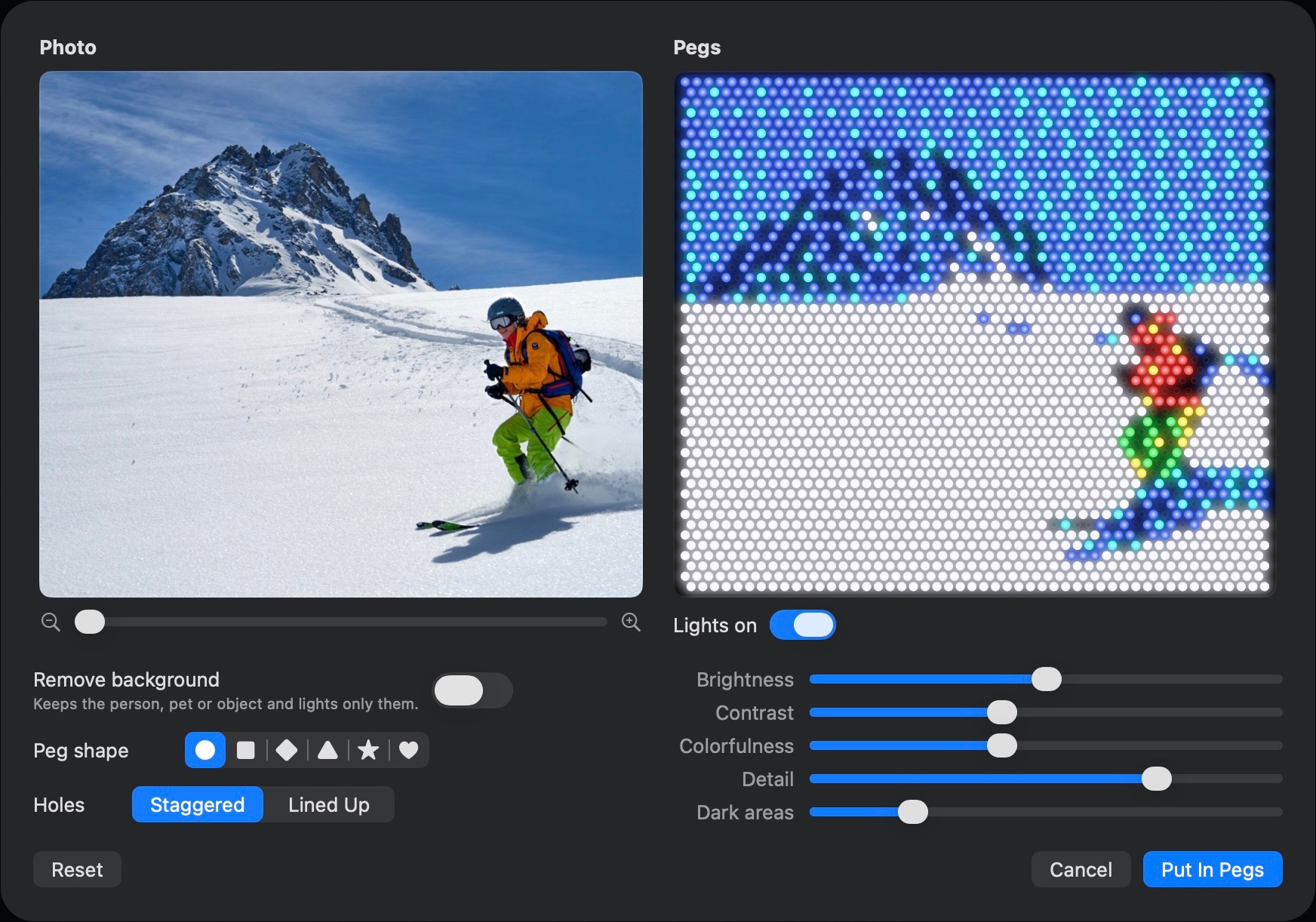
Frame it
Drag the photo and zoom to choose exactly what goes on the board.
Remove the background
One switch keeps the person, pet or object and lets them glow on a black board.
Make it glow
Tune brightness, contrast, colorfulness, detail and dark areas, pick a peg shape, and put it in pegs.
Everything happens on your Mac. Your photos never leave it.
A glowing peg board, the Mac way.
Everything you remember from the original, and everything a Mac app should do.
Push in a peg
Click a hole, or drag to draw. Seven colors, six shapes, and a right-click palette, just like 1992.
Learn more →Lights and patterns
Press ⌘L and every peg glows, with a satisfying switch sound. Twinkle, chase or cycle colors.
Learn more →Photo to Pegs
Turn any photo into pegs, with cropping, background removal and a live preview.
Learn more →Thirteen pictures
From a jack-o'-lantern to a motor yacht, every sample is ready to open and make your own.
Name it in lights
Put a title above your picture on a glossy plate or a neon sign, in the colors you choose.
Learn more →A real Mac app
Autosave, undo, print, share and export, plus quiet automatic updates. Light on battery when idle.
Learn more →Thirteen pictures to light up.
Every one ships with the app and is drawn live here. Point at one to set it twinkling.
Free to play. Yours to keep for $4.99.
Play with every peg, light and picture for free. One purchase keeps and shares what you make, with no subscription.
- Push in pegs: seven colors, six shapes
- Lights, sound and all four patterns
- All thirteen sample pictures
- Titles, tabs and full keyboard control
No card, no account, no time limit.
- Everything in Free
- Save and reopen your pictures
- Photo to Pegs
- Export, print and share
- Copy pictures into other apps
- Up to 3 Macs, with free updates
- Support for an independent developer
One purchase, yours to keep. 30-day refunds, no questions.
A Mac. That's the list.
macOS 14 Sonoma or later
Ready for macOS 27, and right at home on everything in between.
Apple silicon or Intel
One app for every Mac from the last several years, and easy on the battery.
Nothing else
No account, no sign-up, and no internet needed to play.
Your pictures stay yours.
- Photos never leave your Mac. Photo to Pegs and background removal run entirely on your Mac.
- No account, no analytics. The app doesn't track what you do, and neither does this website.
- Your pictures live on your Mac, in ordinary files you can keep, copy and back up.
- Online only to check for updates and, if you buy, to confirm your license with Polar.
“Mike Schwartzman and I made Electric Lights in 1992. Thirty-some years later I rebuilt it for the Mac, peg by peg. Every glow, click and twinkle was sweated over. I hope it makes you smile.”
Bruce Elgort, co-creator of the 1992 original
Back on the screen, thirty-some years later.
Electric Lights began in 1992 as a Windows program by Bruce Elgort and Mike Schwartzman, released by Software in Motion of Melville, New York: a glowing peg board you could play with on a PC.
This version is a from-scratch native Mac app that keeps the original's spirit: the same seven colors, the pop-up palette, the title sign and the joy of flipping the lights on. You can still see the 1992 original in action.
Good to know.
Is Electric Lights really free?
Yes. Drawing, the lights and patterns, sounds and all thirteen pictures are free with no time limit. The $4.99 full version adds saving, Photo to Pegs, export, print, share and copying into other apps.
Which Macs does it run on?
Any Mac with macOS 14 Sonoma or later, on Apple silicon or Intel.
What if it isn't for me?
Email support@electriclights.app within 30 days of buying and you'll get a full refund, no questions asked. See the refund policy.
Is it a subscription?
No. It's one purchase, good on up to three of your Macs, and updates arrive automatically at no charge.
What happens to my photos?
Nothing leaves your Mac. Photo to Pegs, including background removal, runs entirely on your Mac. Electric Lights has no accounts and collects nothing about you.
Is this Lite-Brite?
No. Electric Lights is its own app with a 1992 heritage. Lite-Brite is a trademark of Hasbro, and Electric Lights is not affiliated with or endorsed by Hasbro.
Electric Lights is almost here, for any Mac with macOS 14 or later.